






Why Is My MCB Tripping? Causes & Fixes
Your MCB trips for four main reasons: overload, short circuit, earth leakage, or a faulty breaker. This guide explains each cause, how to find it, and how to fix it safely.
Read More
Crane pendant stations are selected to death — there are dozens of guides on button counts, IP ratings and prices. What is almost never documented is the part that actually causes commissioning delays and warranty calls: the wiring. Which terminals sit behind which button, which conductor colour goes where, and how the same 4-button station is wired differently for a single-speed hoist versus a dual-speed one.
This guide documents terminal layouts and wiring conventions for 2-, 4-, 6- and 8-button pendant stations in the XAC-A style and the COB/COP button-box families, plus the three wiring patterns that cover nearly every hoist application: single-speed direct, dual-speed with fast/slow contactors, and layouts with emergency stop. If you are still choosing the station itself, the 8-button XAC-A8913 pendant control station and the 6-button and 4-button variants in the same series are the reference parts used in the examples below.
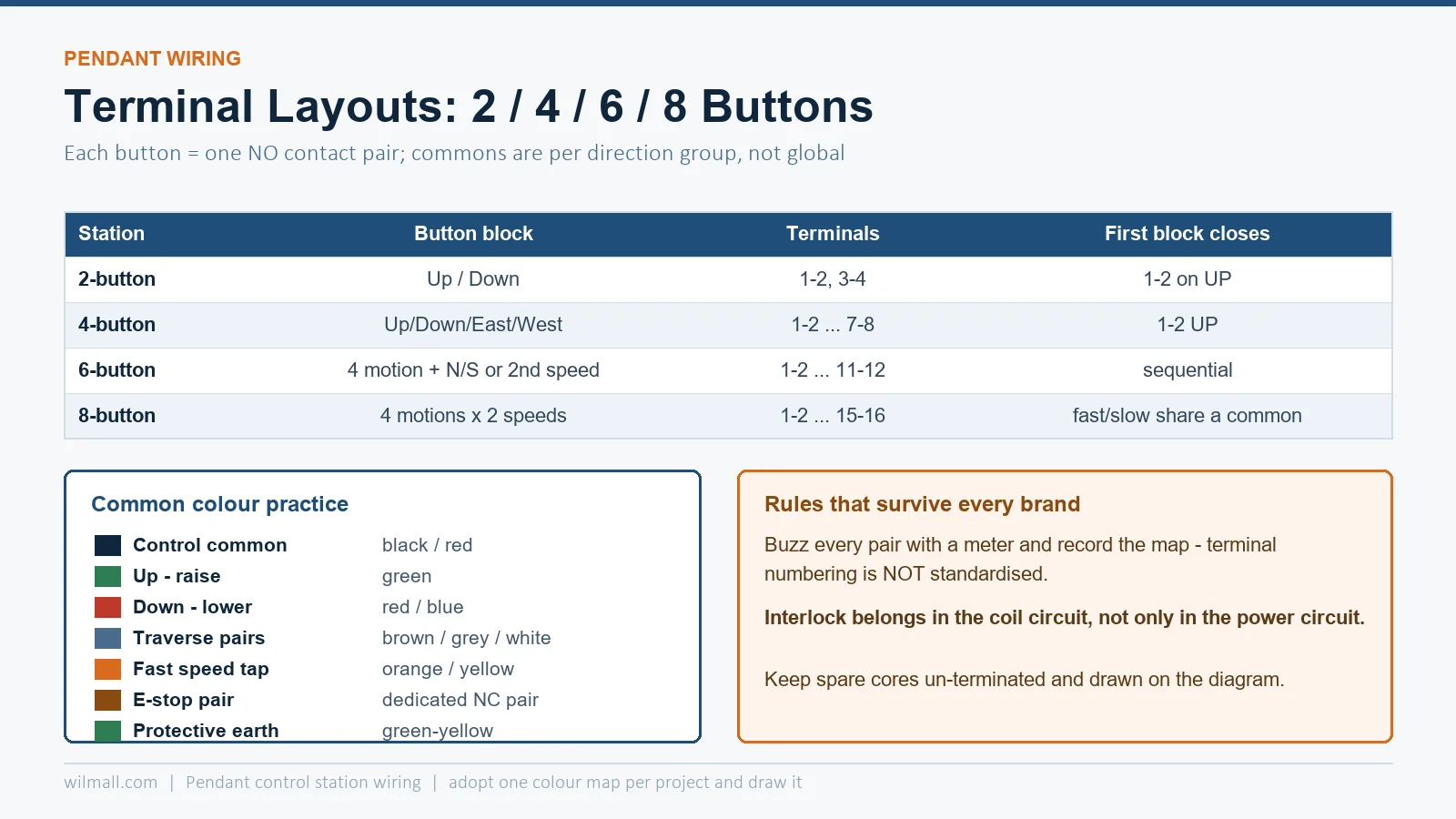
Most European-style pendant stations (XAC-A family and equivalents) expose a terminal strip inside the handle where each button occupies two terminals, numbered sequentially. The convention that matters to the person holding the multimeter:
| Station | Button block | Terminals (typical) | Function of the first button in the block |
|---|---|---|---|
| 2-button | Up / Down | 1–2, 3–4 | 1–2 closes on UP press |
| 4-button | Up / Down / East / West | 1–2, 3–4, 5–6, 7–8 | 1–2 UP, 3–4 DOWN, 5–6 EAST, 7–8 WEST |
| 6-button | 4 motion + N/S or second speed | 1–2 … 11–12 | Sequential per button block |
| 8-button | 4 motions × 2 speeds | 1–2 … 15–16 | Block pairs share a common feed per direction group |
Two rules survive every brand variation. First, each button is a simple normally-open contact — there is no electronics inside a standard pendant, so every terminal pair either conducts when pressed or it does not; a continuity test alone can verify the whole station. Second, common rails are per direction group, not global: dual-speed and reversing layouts depend on how the commons are strapped, which is where miswiring creeps in.
 ” />
” />
Pendant cable usually arrives as a multi-core round cable (7, 12 or 19 cores with a ground). Colour practice differs between regions, and arguing about “the standard” wastes commissioning time. What is genuinely conventional in hoist wiring:
| Conductor | Common colour practice | Function |
|---|---|---|
| Control common | Black or red | Feed to all button commons |
| Up / hoist raise | Green | Reversing contactor coil A1 |
| Down / lower | Red or blue | Reversing contactor coil A1 (opposite) |
| Traverse E/W, N/S | Brown, grey, white pairs | Traverse contactor coils |
| Fast speed tap | Orange or yellow | Second-speed contactor or star contactor |
| Emergency stop | Dedicated pair — often violet + black/red | NC circuit through the E-stop mushroom head |
| Protective earth | Green-yellow | Handle shell and E-stop body bonding |
The defensible approach: adopt one colour map per project, write it on the hoist wiring diagram, and keep spare cores un-terminated at both ends. Re-using “spare” cores mid-life without a recorded map is the classic way a working crane becomes an undocumented one.
The simplest layout covers most small electric hoists. Two buttons (up/down) drive a reversing contactor pair; the interlock between the contactors is electrical — each coil circuit passes through the other contactor’s NC auxiliary contact.
The discipline point: the interlock must be in the coil circuit, not only in the power circuit. Power-side interlocking alone still lets both coils energise briefly if the buttons are pressed together — and a hoist contactor welding under that condition is the failure mode every crane standard tries to prevent.
Dual-speed hoists add a second button pair or a two-step button per direction, and the wiring decides the speed behaviour. Two schemes exist:
| Scheme | كيف تعمل | Wiring consequence | Where used |
|---|---|---|---|
| Separate contactors per speed | Slow contactor runs the motor in one winding; fast contactor switches to the second winding or pole configuration | Fast button must be electrically prevented from energising before the slow contactor is closed (or the scheme’s interlock requirement met) | Two-winding motors, pole-changing motors |
| Star-delta or Dahlander tapping | Speed contactor switches winding configuration; direction contactor separate | Speed and direction interlocks multiply — four NC conditions for a two-speed two-direction axis | Larger hoists, long-traverse axes |
For an 8-button station on a dual-speed hoist, the terminal map typically pairs each direction’s fast and slow buttons onto adjacent blocks with a shared common: UP-fast and UP-slow share one common so that a single feed through the direction interlock serves both speeds. Strapping the commons wrong here produces the classic symptom — pressing fast works, pressing slow runs fast — because the slow button’s output landed on the fast contactor coil through the mis-strapped common.
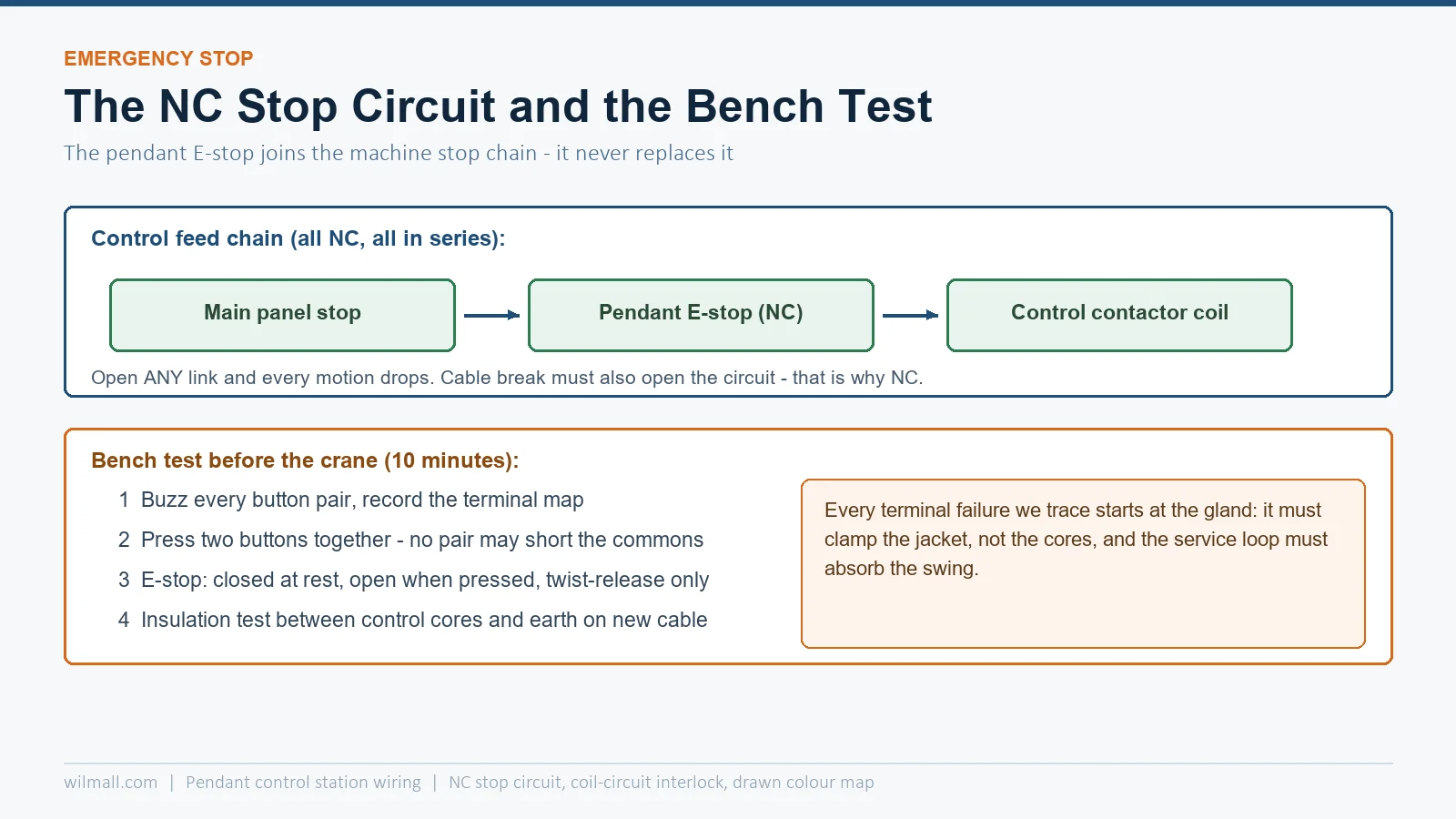
Emergency-stop pendants (the XAC-A6713/A8713 style with the red mushroom head) add an NC circuit that is wired independently of the motion buttons. Three rules are non-negotiable:
The mushroom head’s contacts are usually dual-NC with a mechanical linkage; when extending the circuit to a safety relay or a monitored controller, follow that device’s requirements for contact redundancy — a single NC pair into a safety relay’s dual-channel input will read as a wire-break fault.
 ” />
” />
The pendant cable enters through a strain-relief gland sized to the cable OD. The cable’s internal stress relief must clamp the jacket, and the cores should have enough slack that flexing at the handle never loads a terminal. Pendants swing — that is their job — and every terminal failure we have traced started with a gland clamping the wrong layer or a service loop that was too short.
Ten minutes of bench testing replaces the hour of hoist-side troubleshooting that a single mis-strapped common costs on the day of commissioning.
Two buttons cover a single-speed hoist; four add long travel; six add cross travel; eight bring dual-speed on the main motions. The temptation is to buy eight “for the future” — but every unused pair is a spare terminal that a modification will eventually find, usually without a drawing update. Buy the count the machine uses and add a genuinely spare core in the cable instead.
For stations in this family, the XAC-A8913 8-button pendant is the top of the XAC-A range, the 6-button XAC-A8713 with emergency stop is the most common dual-motion specification, and the compact 2-button class is served by the COB/COP button boxes. See the pendant control station category for the full range with drawings and terminal layouts.
The sequential per-button convention is common but not universal. Always verify with a continuity test against the drawing before energising — five minutes of buzzing beats a welded contactor.
Yes — the extra buttons are simply unused contacts, and the cable must have enough cores. Label the unused terminals so a future modification does not assume they are connected.
Almost always a mis-strapped common between the fast and slow button blocks of the same direction. Re-check the common strapping against the drawing and buzz the button outputs directly to their contactor coils.
NC, always. The stop circuit must open on actuation and on any cable break. A NO stop contact is both non-compliant and dangerous.
A flexible multi-core control cable with a jacket that suits the environment (rubber or PUR for oil and abrasion), a core count matching the buttons plus E-stop plus earth, and an OD that matches the station’s gland range. The cable must be rated for continuous flexing.